
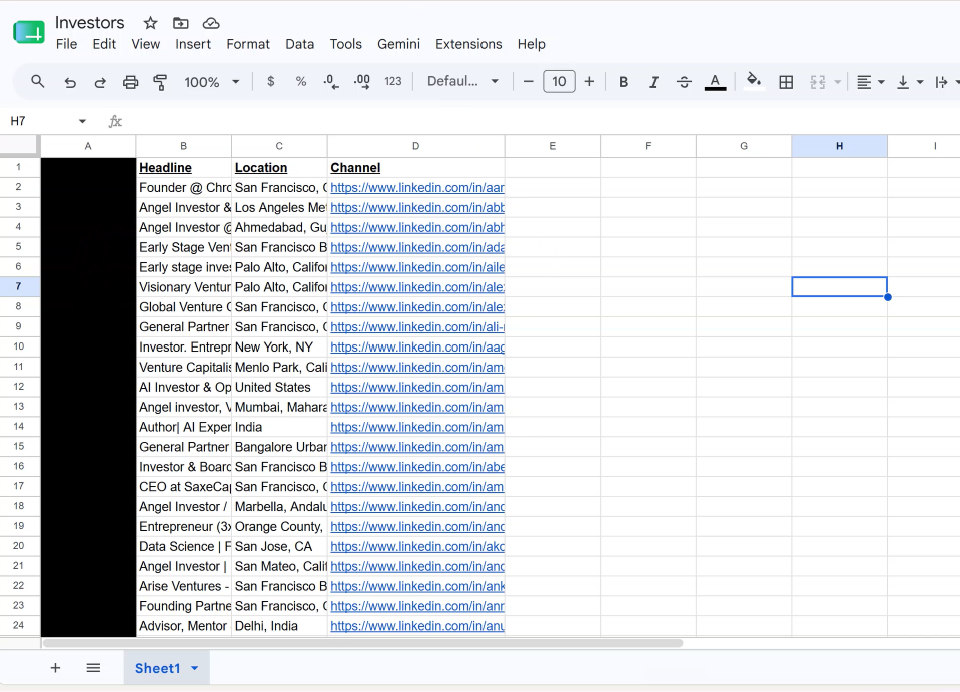


Before Achieve AI can create personalized outreach drafts, it needs a list of leads to work through.
That list starts with a CSV spreadsheet.
Each row in the spreadsheet represents one person, company, investor, partner, podcast, or organization you want Achieve AI to research and draft a message for.
The spreadsheet tells Achieve AI three things:
- Who the contact is
- Where the message should be prepared
- What context may help personalize the draft
A clean, focused spreadsheet gives the AI better inputs and helps it create better drafts.
==> Click here to download a CSV starter template
The Required Column: channel
This tells Achieve AI where the outreach draft should be prepared.
Examples include:
- Email address
- Phone / WhatsApp number
- LinkedIn- / Facebook profile URL
- Instagram / X handle
Think of channel as the outreach destination.
If the channel is an email address, Achieve AI prepares an email-style draft. If it is a LinkedIn profile, it prepares a LinkedIn DM. If it is a phone number, it prepares an SMS-style draft.
You can use one channel type for the whole spreadsheet, or mix multiple channels in the same CSV.
Add Helpful Context Columns
Although channel is the only required column, you should add a few extra columns whenever possible.
Good context columns include:
- Name
- Company
- Role
- Location
- Website
- Industry
- Notes
- Lead source
- Reason for outreach
You do not need a complicated spreadsheet. In most cases, the required channel column plus three to five useful context columns is enough.
The goal is to help Achieve AI understand who the contact is and why they are relevant.
Example CSV Structures
For sales outreach, you might use:
channel, name, company, role, website, notes
For investor outreach, you might use:
channel, name, firm, investment_focus, portfolio_notes, reason_for_fit
For partner or podcast outreach, you might use:
channel, contact_name, company_or_show, topic, website, reason_for_outreach
These are only examples. Use the columns that give Achieve AI the clearest context for your specific campaign.
Example Table
| channel | name | company | role | website | notes | reason_for_outreach |
|---|---|---|---|---|---|---|
| alex.morgan@northstarops.com | Alex Morgan | Northstar Operations | Founder | northstarops.com | Runs operations consulting for mid-market service businesses | Potential fit for sales automation and client outreach support |
| https://www.linkedin.com/in/jordan-lee-growth | Jordan Lee | ScalePath Advisors | Managing Partner | scalepathadvisors.com | Advises B2B SaaS companies on growth strategy | Relevant strategic partner for founder introductions |
| @maya_builds | Maya Chen | Chen Product Studio | Product Consultant | chenproductstudio.com | Posts about productized services and founder workflows | Potential customer for AI-powered outreach systems |
| +1 415-555-0198 | Daniel Brooks | Brooks Capital | Angel Investor | brookscapital.co | Invests in early-stage software and productivity tools | Investor with interest in AI and workflow automation |
| https://instagram.com/sarahsystems | Sarah Patel | Systems for Scale | Business Creator | systemsforscale.com | Creates content for agency owners and consultants | Possible partner for outreach-focused campaign |
| +1 646-555-0137 | Priya Shah | LaunchWell | CEO | launchwell.io | Runs a startup advisory firm for seed-stage founders | Potential sales prospect and referral partner |
| marcus.rivera@riveravc.com | Marcus Rivera | Rivera Ventures | Venture Partner | riveravc.com | Focuses on B2B software, automation, and vertical SaaS | Relevant investor for AI-enabled business tooling |
| https://www.linkedin.com/in/emily-carter-podcast | Emily Carter | The Operator Hour | Podcast Host | operatorhour.fm | Interviews founders, operators, and SaaS executives | Good podcast outreach target tied to business visibility |
| https://facebook.com/greenfieldclinics | Tom Nguyen | Greenfield Clinics | Owner | greenfieldclinics.com | Operates a small group of local wellness clinics | Potential customer for lead management and outreach automation |
Where to Find Leads
You can build your spreadsheet from many sources, including:
- CRM exports
- Warm lead lists
- LinkedIn searches
- Investor databases
- Conference lists
- Podcast directories
- Media lists
- Existing customer lists
- Manually researched prospects
The best list is not always the biggest list. A smaller list of relevant contacts will usually produce better results than a large list of random leads.
For sales outreach, focus on people or companies that match your ideal customer profile.
For investor outreach, focus on investors who are relevant to your market, stage, category, or business model.
For partner outreach, focus on people or organizations where there is a clear reason to collaborate.
Using LinkedIn and Social Profiles
LinkedIn, Instagram, Facebook, and other social platforms can be useful for building your spreadsheet.
However, Achieve AI may not always be able to directly access every social profile. To improve results, copy the most useful public details into the CSV..
Helpful details include:
- Name
- Company
- Role
- Location
- Bio
- Website
- Short notes about why the person is relevant
For example, instead of only adding a LinkedIn URL, you can also include the person’s name, company, title, and a short reason for outreach.
This gives Achieve AI a stronger starting point when creating the draft.
Comet Browser
To automate this process, you can use the Comet browser, by Perplexity. It’s free, and you can download it at their Official Website. We are not affiliated with them in any way.
Keep Each Spreadsheet Focused
Each CSV should have one clear campaign goal.
Do not mix unrelated outreach types in the same spreadsheet.
Better examples:
- One CSV for sales prospects
- One CSV for investor outreach
- One CSV for podcast outreach
- One CSV for strategic partners
- One CSV for warm leads
A focused spreadsheet helps Achieve AI create more consistent drafts because every row supports the same campaign goal.
CSV Quality Checklist
Before uploading your spreadsheet, check that:
- Each row contains one contact, company, investor, or organization.
- Every row has a valid
channel. - Column names are clear.
- The data is clean and readable.
- You added three to five helpful context columns when possible.
- The notes are useful and specific.
- The spreadsheet matches one clear outreach goal.
- The file is saved as a CSV.
Clean data makes the campaign easier to run and improves the quality of the drafts.
Next Step
Once your CSV is ready, upload it into Achieve AI when creating your outreach automation.
The spreadsheet does not need to be complex. It just needs to be clean, focused, and useful.
Start with the required channel column, add helpful context, keep one lead per row, and save the file as a CSV.