


One of the biggest mistakes people make on X is posting into the void.
They publish content, hope the algorithm picks it up, and wait for people to find them. But if you want to actually build a following, you have to get involved in active conversations that are already happening in your niche.
This automation helps you find those conversations consistently and draft relevant replies.
1. Create Your Source List
Create a list of the top 100 influencers, creators, customers, competitors, partners, or accounts in your niche. This is often called a “Dream 100” list: a curated group of people or brands you would most want to reach, learn from, build relationships with, or get in front of.
On X, you can organize these accounts into a private or public List so they are easier to monitor in one place: https://x.com/i/lists/create
This list will become your source feed for finding relevant posts to analyze, track, reply to, or engage with. The better your source list, the better your content research and outreach will be.
2. Open Your Browser Console + Run the Script
Next, open your X List in your browser. Make sure you are on the actual List feed page, where posts from the accounts in your source list are visible.
Then open your browser’s developer console:
- Chrome: Right-click anywhere on the page, click Inspect, then open the Console tab.
- Safari: Go to Safari > Settings > Advanced, enable Show features for web developers, then use Develop > Show JavaScript Console.
- Edge: Right-click anywhere on the page, click Inspect, then open the Console tab.
Paste the script below into the console and press Enter.
The script will scroll through your X List, look for recent posts, filter out very short posts, and download the matching results as a plain text file. By default, it looks for posts from the last 2 hours with at least 30 words, then saves them in a file called x-list-posts-recent.txt.
Each saved post will include the post ID, post URL, date, and content, which makes the output easier to review, analyze, or paste into another tool.
(async () => {
  const CONFIG = {
    minWords: 30,
    withinMinutes: 120,
    scrollDelayMs: 1200,
    maxScrolls: 80,
    stopAfterNoNewRounds: 8,
    fileName: "x-list-posts-recent.txt"
  };

  const sleep = (ms) => new Promise(resolve => setTimeout(resolve, ms));

  const getPostLinkFromArticle = (article) => {
    const link = [...article.querySelectorAll('a[href*="/status/"]')]
      .map(a => a.href)
      .find(Boolean);

    return link || null;
  };

  const getPostIdFromLink = (link) => {
    const match = link?.match(/\/status\/(\d+)/);
    return match ? match[1] : null;
  };

  const getPostDateFromArticle = (article) => {
    const timeEl = article.querySelector("time[datetime]");
    if (!timeEl) return null;

    const date = new Date(timeEl.getAttribute("datetime"));
    return Number.isNaN(date.getTime()) ? null : date;
  };

  const getPostContentFromArticle = (article) => {
    const textEls = article.querySelectorAll('[data-testid="tweetText"]');

    return [...textEls]
      .map(el => el.innerText.trim())
      .filter(Boolean)
      .join("\n")
      .trim();
  };

  const countWords = (text) => {
    return text
      .replace(/https?:\/\/\S+/g, "")
      .split(/\s+/)
      .filter(Boolean).length;
  };

  const cutoff = Date.now() - CONFIG.withinMinutes * 60 * 1000;
  const posts = new Map();

  let noNewRounds = 0;

  for (let i = 0; i < CONFIG.maxScrolls; i++) {
    const beforeCount = posts.size;
    const articles = [...document.querySelectorAll('article[data-testid="tweet"]')];

    for (const article of articles) {
      const postLink = getPostLinkFromArticle(article);
      const postId = getPostIdFromLink(postLink);
      const postDate = getPostDateFromArticle(article);
      const content = getPostContentFromArticle(article);

      if (!postId || !postLink || !postDate || !content) continue;
      if (postDate.getTime() < cutoff) continue;
      if (countWords(content) < CONFIG.minWords) continue;

      posts.set(postId, {
        id: postId,
        url: postLink,
        date: postDate.toISOString(),
        content
      });
    }

    if (posts.size === beforeCount) {
      noNewRounds++;
    } else {
      noNewRounds = 0;
      console.log(`Saved ${posts.size} matching posts so far...`);
    }

    if (noNewRounds >= CONFIG.stopAfterNoNewRounds) {
      console.log("Stopping: no new matching posts found after several scrolls.");
      break;
    }

    window.scrollBy(0, Math.round(window.innerHeight * 1.8));
    await sleep(CONFIG.scrollDelayMs);
  }

  const output = [...posts.values()]
    .map(post => [
      `Post ID: ${post.id}`,
      `URL: ${post.url}`,
      `Date: ${post.date}`,
      `Content:\n${post.content}`
    ].join("\n"))
    .join("\n\n---\n\n");

  if (!output) {
    console.warn("No matching posts found. Try increasing the time window or lowering the minimum word count.");
    return;
  }

  const blob = new Blob([output], { type: "text/plain;charset=utf-8" });
  const url = URL.createObjectURL(blob);

  const a = document.createElement("a");
  a.href = url;
  a.download = CONFIG.fileName;
  document.body.appendChild(a);
  a.click();

  document.body.removeChild(a);
  URL.revokeObjectURL(url);

  console.log(`Downloaded ${posts.size} posts to ${CONFIG.fileName}`);
})();
If you want to collect more posts, adjust the settings at the top of the script. For example, increase withinMinutes to 360 to pull posts from the last 6 hours, or lower minWords to 15 if you want shorter posts included.
3. Use This Prompt in AchieveAI Automations
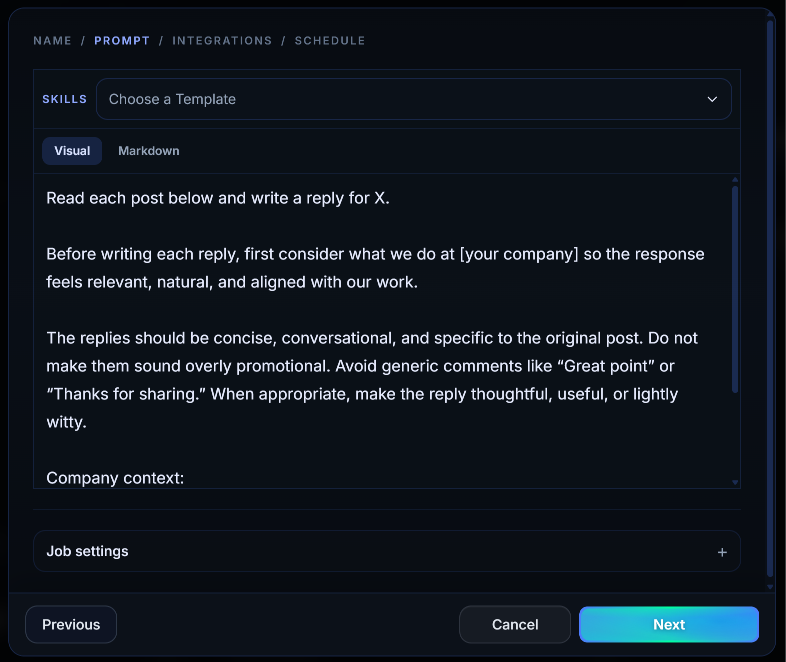
Open the .txt file you downloaded in the previous step, copy the contents, and paste them into AchieveAI.
Then use a prompt like this:
Read each post below and write a reply for X.

Before writing each reply, first consider what we do at [your company] so the response feels relevant, natural, and aligned with our work.

The replies should be concise, conversational, and specific to the original post. Do not make them sound overly promotional. Avoid generic comments like “Great point” or “Thanks for sharing.” When appropriate, make the reply thoughtful, useful, or lightly witty.

Company context:
[Briefly describe your company, product, audience, and point of view]

Posts:
[Paste the content from your .txt file here]
You do not need to over-explain the task. The important pieces are the company context, the posts from your .txt file, and a clear instruction that the goal is to write relevant X replies.
Why This Works
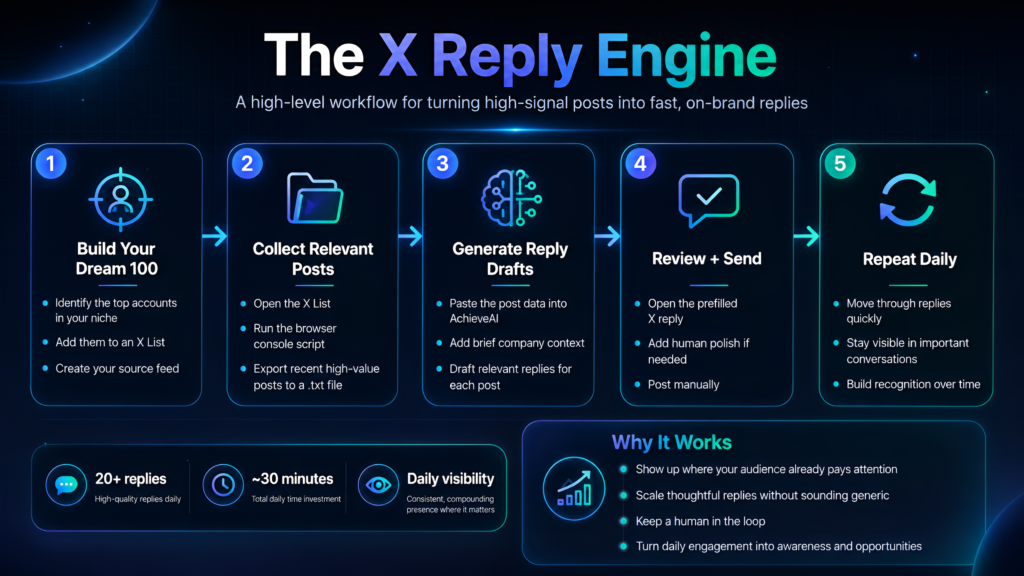
The biggest accounts in your niche already have your audience’s attention.
Instead of waiting for people to discover you, this workflow helps you show up directly inside the conversations they are already reading.
AchieveAI helps you draft relevant, on-brand replies fast. You still review and post each reply manually, which keeps the workflow human, high-quality, and compliant with how X works today.
The result: you can respond to dozens of important posts in less time, consistently appear in front of the right audience, and build recognition by joining the conversations that already matter in your market.